
Translating Fabric Composition Images: Keep Each Percentage With the Right Part
Before translating a fabric composition graphic, record which materials and percentages belong to each product component. Keep the outer fabric, lining, filling, and trim separate wherever the approved specification distinguishes them. A fluent translation can still mislead if it moves a percentage under the wrong heading.
Build a component-by-component reference
Start with the current specification for the exact SKU and variant shown in the image. Write down the component, material name, percentage, and source revision. Ask the product owner to resolve missing or conflicting information before editing. A photograph of a fabric cannot establish its composition.
For an illustrative jacket, the approved reference might list an outer fabric of 70% cotton and 30% polyester, with a 100% polyester lining. These are invented numbers for this example. The two sections describe different components; combining all three percentages into one list would hide that distinction.
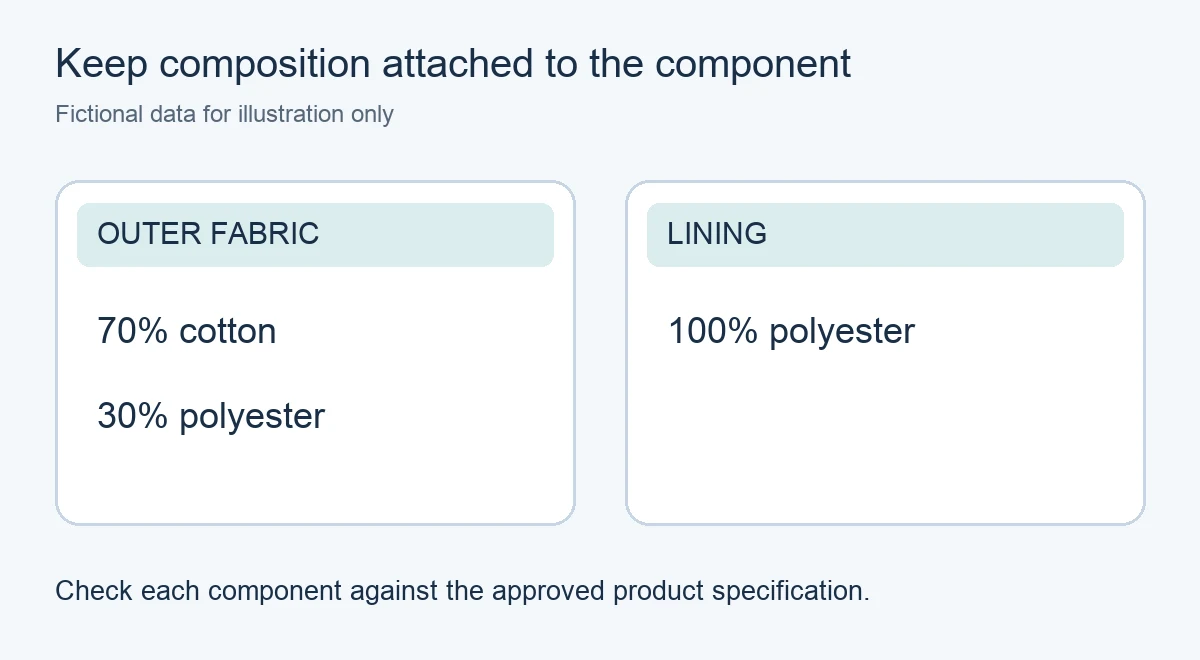
Illustrative data created for this article. This is not a product test, supplier specification, or garment label.
Translate headings and material names together
Keep each translated heading attached to its material list. Check the target-language terminology against the product record and the wording approved for that market. If the source says only “fabric” while the specification separates an outer layer and a lining, request clarification rather than inventing a heading.
PicTech AI’s image translation tool recognizes and translates image text and provides layout controls for reviewing the result. After translation, inspect the material names, percent signs, digits, and component headings against the reference. A correct-looking layout does not establish that a composition claim is true.
Fix layout without changing the claim
A longer translated material name may wrap onto another line. Keep its percentage on the same line when possible, or arrange the text so the relationship is unambiguous. Leave enough space before the next component heading. Avoid reducing the type until the distinction disappears at gallery size.
Use the text and placement controls described in the PicTech AI editor guide to correct wording and positioning. Compare the source and result, then export and reopen the downloaded file. Check that “lining” has not moved into the outer-fabric section and that a cropped edge has not removed a percent sign.
Review the whole listing for consistency
Compare the finished graphic with the listing’s written material description and the selected variant. If a different colorway has a different specification, keep its image separate. Save the approved graphic with its source record so a later specification change can be traced to the correct asset.
This workflow checks a marketing image against product data. For a sewn-in label, regulated disclosure, or market-specific naming requirement, have the responsible product reviewer approve the wording for that use. Do not treat an image translation as certification of a material claim.