
When translating a product compatibility chart, keep the difference between “fits directly,” “requires an adapter,” and “not verified.” A blank cell in the supplier’s artwork is missing information. Confirm what it means before releasing the translated chart.
Check the status behind every mark
Start with the approved compatibility list for the exact product variant. Record the row identifier, the column identifier, the status and any required accessory. If the source artwork uses ticks, dashes or shading, ask the product owner to confirm their meanings. Some suppliers use a dash for “does not fit.” Others use it for an untested combination.
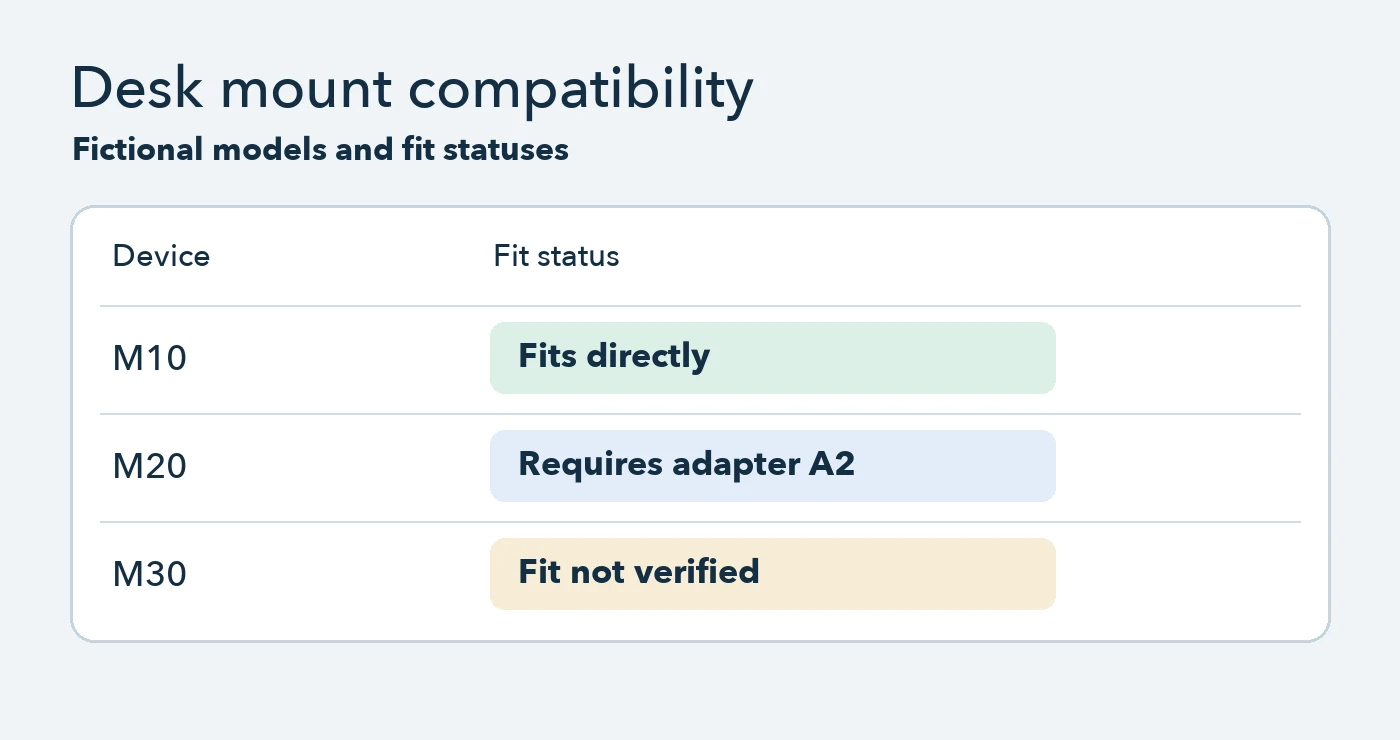
For a fictional desk mount, the M10 device connects directly and the M20 requires adapter A2. The supplier has no result for M30. Keep the M30 row out of the published graphic until you have verified its status, or use an explicit status the product owner has approved. If a combination is confirmed incompatible, label it separately.
Put the requirement in the same cell as the model
Keep the same row and column order in the first translation pass. Write “Requires adapter A2” next to M20, where shoppers can see the requirement without scanning the whole chart. If a shared legend saves space, keep the full legend visible with the matrix and use distinct labels or symbols. Use color as a second cue. In a grayscale export, red and green may be hard to distinguish.
If a marketplace offers several variants under one listing, put the relevant product variant in the chart heading. Check that each export still names the variant tested, especially when neighboring variants look alike.
Review the chart before exporting
In PicTech.ai Image Translator, start with one chart. The editor guide describes Compare Edit and controls for correcting or moving translated text. Read across the chart row by row with the approved compatibility list open. Confirm that the model, fit status and accessory remain on the same row. If the source used a dash with a confirmed meaning, replace it with the approved wording where the layout allows.
Preview the exported file at the width shoppers will see. Ask a reviewer to find one direct fit, one fit that needs an accessory, and one unverified combination if the latter appears. If they need the source chart to tell those apart, shorten the copy or move the full matrix into readable listing text. Update both places together when the approved compatibility list changes.